
To configure:
- Open order entry
- Go to Utilities > Set Up > Configure Email
- Enter your settings per the below. Jeremy's is just an example, Make sure to use YOUR NAME and info, NOT Jeremy's. The SMTP server and port will be the same for everyone.
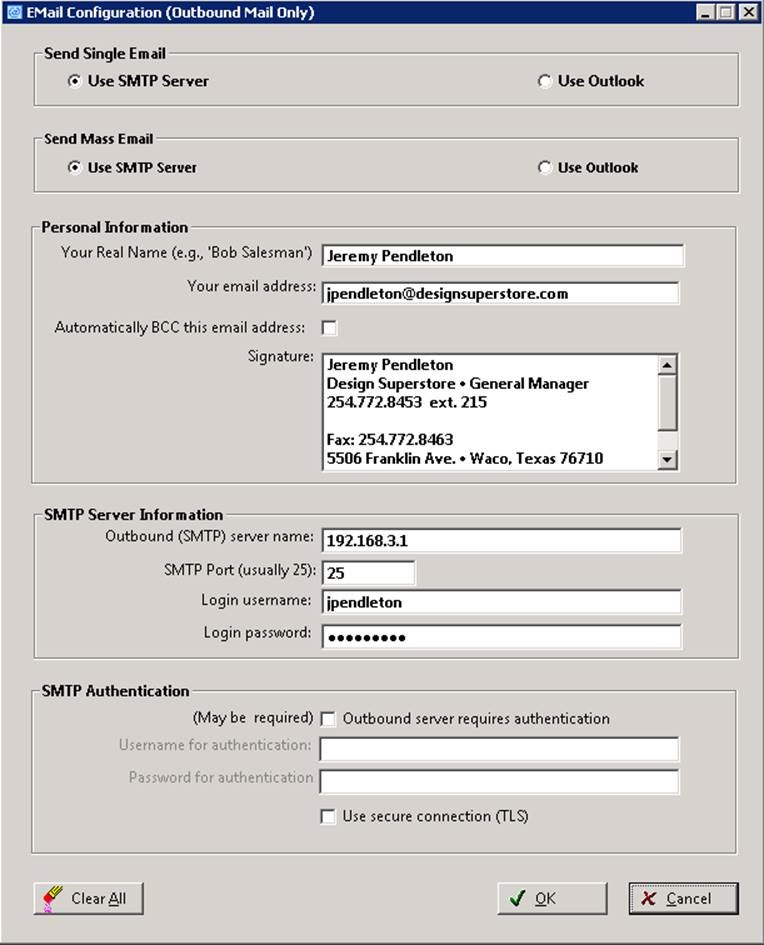
- Click ok.
- Now highlight an invoice or quote and click the button
- Click on invoice or whatever else you need to send.
- If you do not need to actually print the invoice, uncheck the box that says “Print Invoice”
- Check the box that says “Email PDF”.
- Click print.
- An email form now appears that gives you the opportunity to enter the To: address, edit the subject and add a message to the customer.
- Click send.
- Done!
Comments
0 comments
Article is closed for comments.